Wednesday, 29 March 2017

Use of sumifs

Sumifs This foumula is a conditional formula. Like when we have some condition and we have to find out the sum with some condition. So then we will use this function.
Through the formula of sumifs we can find the sum with the condition.


For Example we have 5 Sales men and we want to find that how much product sale by each sales men. So we can easliy find.

Syntex__ =sumifs(sum range,criteria_range1, criteria1, creiteria_range2,cretria2)

Sum_range          =  Select the sum range
Creteria_range1  = is select the range First column 
Criteria 1             = Slect the name which you find
Cretria_range2    = Select the range Second column
Cretria2               =Select the product you want to find


When you will change the salesmen name (where you apply the formula) it will show you the total sale of that particular salesmen.

Monday, 13 March 2017

How to use vlook up

VLOOKUP foumula, as the formula name show its use. This formula is use when we have data in bulk and we have to find one person detail.

SYNTEX: =VLOOKUP(lookup_value,table_array,col_index_num,[range_lookup])

Lookup_value    = Select the cell which you find
Table_array        = Select the whole table
Col_index_num = Column number is the table have the numer of column
range_lookup     =  0 (zero is true value)

Here is an Example of vloolup


Here is the link

https://docs.google.com/spreadsheets/d/1GmZYiQ6-J_qKjteDQIJcaNu_vLOK4b23nWt_zitpc5w/edit#gid=0`

Tuesday, 7 March 2017

Forcast Formula

Forcast formula is used to predict anything in excel.
 For example- We sale somthing and we have the detail of sale for the month of jan, feb, March, April and now we want to know that what will be the sale in December month. So then we use forcast formula. You Can't totally Dependent  that result which is given by the formula but It will give you the approx value.
So here is an Example.


SYNTEX- (X,Known_y's, known x_'s)

X               =is month you want to know the sale like october
known_y's= known result (the Sale )
known_x's= known Result( month)


Saturday, 4 March 2017

PMT FORMULA

Basically PMT formula is use to calucalt the amount of loan.We will try to uderstand the formula throgh the Example. 

Suppose we have taken loan form the bank and we have to find out the EMI Amount. 

Syntex
=pmt(rate,nper,pv[fv],[type])

 rate  = rate is The percent which is fix by the bank on the loan
 nper = nper is the time which is in month like 5 years(60 months)

 pv    = pv is present value (we can say the loan which is taken by us)


The value will show in minus because we are paying the money.


Tuesday, 21 February 2017

Home Function (shortcut Keys)


shortcut keys are the most importnat in excel by using the shortcut keys we can make speed in excel and To work in excel will be very easy to use so these are some shortcut keys.

1. Auto Sum                         Alt + (Apply this formula in that cell where you want to sum)


2. one to another page         Ctrl  page up ( Press these two key ctrl and page up for the next page and
                                                Ctrl page down for previous page) for excel sheet


3. one sheet to another         Atl  tab (Press these two key it will help to go in another sheet)


4. select the whole Row       Shift and space (Press the Shift and Space key Together)


6.  Find                                  Ctrl F


7. close the whole sheet         Alt F4


8. Minimize the Excel sheet      Window M(Press the Window key and then M)

9. Go at the top                            Ctrl and upper arrow

10. Go at the bottom                   Ctrl and down arrow

11. Apply Bordre                       Alt H B A(press these key one after one)

12. Remove Border                   Alt H B N

13. Merge cell                            Alt H M M

14. Unmerge cell                        Alt H M U

15. Increse font Size                  Alt H F S( Then set the Size of Font)

16. Wrap Text                           Alt H W( It is use when We want a name in one cell) eg - Aditya                                                          Singh negi we want this name in one cell then We will use this key


17. Insert Cell                        Alt H I I(Then Enter)


18. Preview file                        Ctrl F2

19. Minimize Excelsheet          Ctrl F9

20.Fill Color in Cell                 Alt HH (Then Select the color)

21. Duplicate                            ctrl D

22.
Freez Row                         Alt then W then F then R (for the Row)

23. Freez Column                   Alt then W then F then C (For the column)

24. Freez Row and column     Alt then W Then F then F (to Freez the row and column)

Monday, 20 February 2017

Frequency

               Frequency formula

We use this formula when we have to sapparate the data in Interval. Using this formula we can saprate the data into the part.
for Example we hav a data of the student weight and we have to find that how many student have weight is 0-15 and how many have 15-50 and how many have 50-100
=frequency(select data , then select interval )

 Data_ array   = Select the range of weight(Kg)
 bins_ array    = Weight interval column

First of all select the whole that is highted with red color
in that cell we will apply the formula of frequency.

(=frequency(select data , then select interval )
then press the three key together (ctrl shift enter)

here is the link

https://drive.google.com/drive/my-drive


use of Sumif

 USE OF SUMIF

This is the Fantastic formula of excel and this formula is use for when we have the data in bulk and we have to find out the sum of the same product
For example-  We have a data and we have to find that how much Quantity sold of one product.

So Here is the Example.


Range required. The range of cells that you want evaluated by criteria. Cells in each range must be numbers or names, arrays, or references that contain numbers. For Example The Column of Product as Shown in Example.

Criteria required. Criteria is that select the product that you want to sum.
 As shown in the Example select the Mango

    sum range: The actual cells to add, if you want to add cells other than those specified in the range argument. For Example the column of Quantity.

If you want to find that all prroct how much Quantity has been Sold so just Copy the 
Formula in another Cell you will get the how much Quantity of another produch Sold.


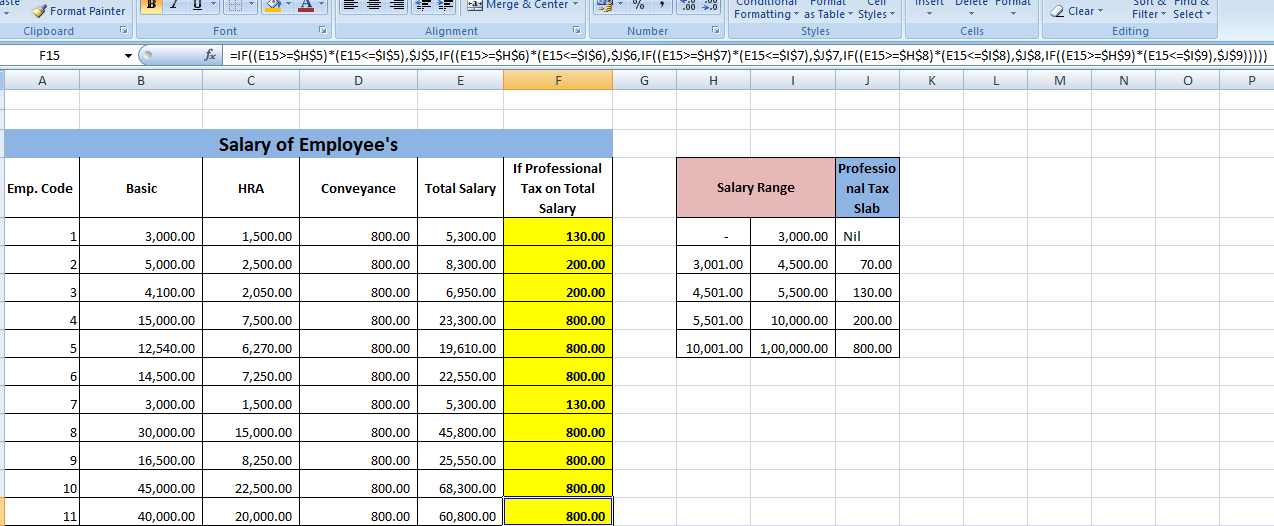
calculation of professional tax

Normally professional tax in not applicable all over the country but there are some state where the government take professional tax  Kar...